How can I report fake Google reviews that are part of an extortion scam?
To report fake Google reviews linked to extortion, use Google’s Merchant Extortion Report Form while logged into the Google account that manages your Google Business Profile. Collect all relevant evidence, describe the fake review scam clearly, and submit the form. Google will investigate and may remove the extortion reviews if they breach its content policies.
Here's What We Have Covered In This Article
Understanding Fake Review Extortion and Why It Happens
Google review extortion is a growing threat to honest businesses. It usually begins when scammers post false one-star ratings on your Google Business Profile (GBP). These extortion reviews are followed by a message, often through WhatsApp or email, demanding money or goods in exchange for removing them. This behaviour is a form of digital blackmail.
Scammers are targeting platforms such as Google Maps and Google Search because their reviews are public and highly visible. A handful of bad reviews can cause immediate and lasting reputation damage.
Smaller businesses are particularly vulnerable to these types of fake Google review scams. Many do not have the time or expertise to recognise extortion patterns or protect their profiles from manipulation. Google’s Trust and Safety Team is actively working to combat these scams, but the sheer volume means that scammers can sometimes slip through the cracks.
Keywords: fake Google review scam, Google review extortion, extortion reviews, report fake review, Google business scammer.
How to Tell If a Review Is Part of an Extortion Scam
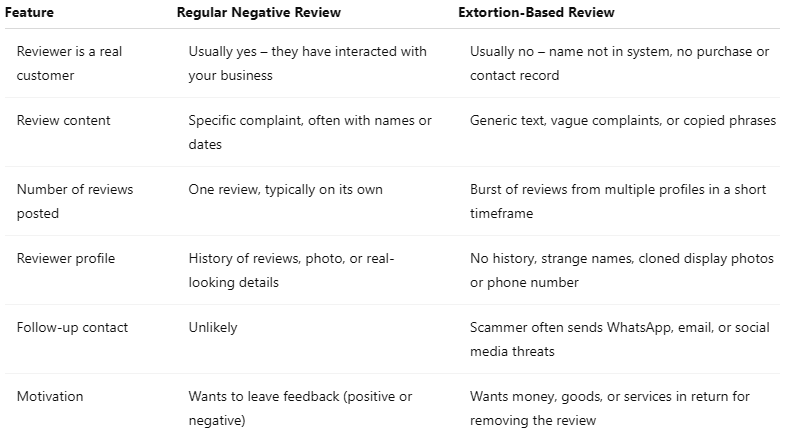
What is the difference between a real negative review and an extortion attempt?
Here is a quick comparison to help you identify a fake review scam, Recognising these signs helps you spot review extortion attempts quickly.:

Pro Tip: Never respond to extortion demands; even one reply can encourage more fake reviews or threats.
Protect Your Reputation Today
Struggling with fake Google reviews? Get expert support to defend your business and restore your profile.
Why Fake Extortion Reviews Damage Your Business and Rankings
The impact of extortion reviews goes far beyond your star rating. These fake reviews:
-
Lower your visibility in the Local Pack on Google Maps
-
Trigger a drop in click-through rates from search results
-
Lead to fewer bookings or enquiries
-
Distort public perception of your brand over time
Even one-star reviews that seem minor can have ripple effects on conversion rates and visibility. When your reputation suffers, trust signals disappear and customers may choose competitors instead.
Review extortion also interferes with search behaviour, reducing click-through rates and altering the path to conversions. The impact can persist even after the reviews are removed.
The Clear Warning Signs of a Review Extortion Attack
Here are the red flags that signal a review extortion scam:
-
Multiple one-star reviews posted in a short window of time
-
Reviewer names that seem suspicious or disconnected from your industry
-
Near-identical content or review clusters appearing suddenly
-
WhatsApp messages or emails demanding payment to delete reviews
-
Deleted reviews that reappear from different profiles
If you notice these signs, you may be the target of a coordinated Google business scam. Detecting this early enables you to act quickly to report fake reviews.


Pro Tip: Always take full-screen screenshots showing the reviewer’s name, rating, and timestamp, this detail makes or breaks your case.
Stop Scammers from Ruining Your Ratings
Discover how we protect businesses from online extortion and improve your online credibility.

What Happens After You Send the Report: Timelines and Outcomes
Once your report is submitted, Google’s moderation team will:
- Investigate each flagged review individually
- Cross-check metadata and timestamps for signs of coordinated attacks
- Remove reviews that clearly violate the content policy
- Decline removals if the provided proof is insufficient or unclear
You may not receive a confirmation email, so monitor your Google Business Profile regularly for updates.
Why Google Sometimes Removes Only Some Reviews (and What to Do Next)
Partial review removal happens when:
- Not all reviews show clear signs of extortion
- Some fake reviewers use different contact methods or identities
- Your evidence was incomplete or lacked essential details
Here is what to do:
- Re-submit your appeal via the Review Removal Tool
- Add missing screenshots, timestamps, or contact records
- Use Google Business Profile chat support to request escalation
Review removal works best when the scammer’s intent is clearly demonstrated through evidence.

How to Handle Ongoing Messages, Threats, or Demands from the Scammer
If the scammer continues to contact you:
- Do not engage or send any form of payment
- Save screenshots of every message and store them securely
- Block the phone number, email address, or social media account
- Report the incident to Action Fraud UK or your local police
Remain calm and continue documenting each contact attempt. Every communication supports your report.
Preventing Future Attacks and Protecting Your Google Business Profile
Protecting your profile over the long term is essential. Use these strategies:
- Monitor Google Maps and Google Search reviews weekly
- Set up Google Alerts for your business name
- Encourage genuine customers to leave positive reviews
- Respond promptly and constructively to legitimate feedback
- Use review monitoring tools to identify patterns or suspicious spikes
These practices form the foundation of a strong online reputation strategy.
When You May Need to Consider Police or Legal Action (UK-Friendly Guidance)
Fake review scams may escalate into criminal activity. Consider reporting the case when:
- Threats are repeated or become personal in nature
- Scammers impersonate individuals or misuse identity
- You experience ongoing harassment despite blocking contacts
Recommended steps:
- File a case with Action Fraud UK
- Retain all review links, messages, and timestamps
- Contact Citizens Advice for legal support and next steps
- Report directly to police if your safety is compromised
Review scams that involve blackmail or impersonation may breach the Communications Act 2003.
Using AI to Help You Complete Google’s Extortion Report Form
AI tools such as ChatGPT or Google's own Gemini can act as a free consultant while you gather your report materials. Here is how to use AI effectively:
- Upload screenshots of fake reviews, messages, or scammer profiles to identify key information
- Describe your situation, and AI can help structure your report clearly and concisely
- Ask the AI to verify whether your documentation matches Google’s reporting guidelines
- Use it as a support tool to avoid missing essential fields or evidence requirements
AI acts as a digital assistant that helps you remain calm and organised while you prepare your report for Google’s Trust and Safety Team.
Final Checklist: What to Do Right Now to Protect Your Business
- Screenshot fake reviews, reviewer profiles, and all scam messages.
- Record names, phone numbers, email addresses, and timestamps.
- Gather evidence including profile URLs and WhatsApp or email communications.
- Submit the Google Merchant Extortion Report Form with all attachments.
- Monitor your Business Profile for any follow-up reviews or contact attempts.
- Prepare additional proof in case you need to appeal or escalate your case.