
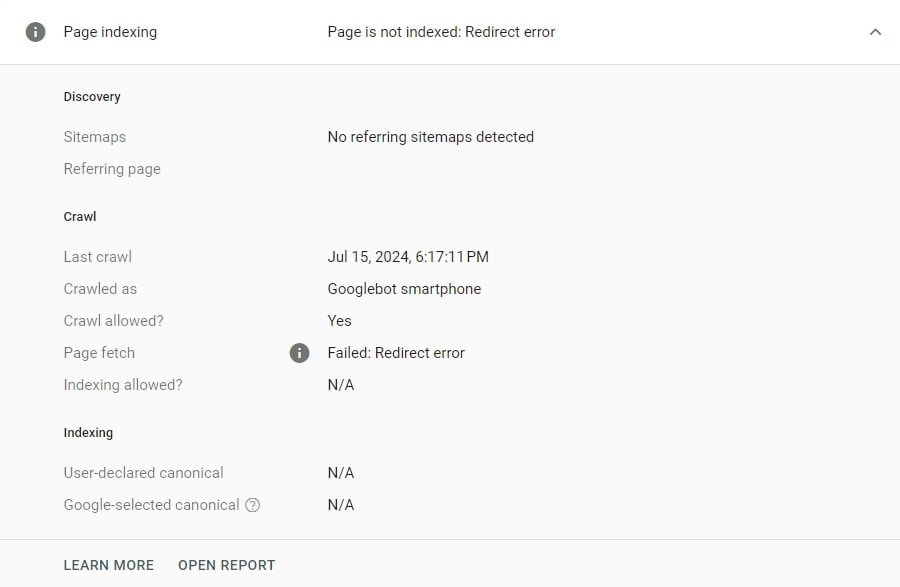
How To Fix Redirect Error In GSC
Ever come across a “Redirect error” in Google Search Console and felt a bit lost? Don’t worry, you’re not alone! This short guide will walk you through what this error means and how to fix it, step-by-step, so your website remains in tip-top shape.
Understanding “Redirect Error” in Google Search Console
When you see a “Redirect error” in Google Search Console, it means that Googlebot tried to follow a redirect on your site but couldn’t reach the final destination. This can stop your pages from being indexed, which isn’t great for your SEO.
Causes of “Redirect Error”
Too Many Redirects in a Row
Imagine you want to redirect URL A to URL C, but you also add URL B in between. This creates a redirect chain, which can confuse Googlebot and use up unnecessary resources.
Redirect Loops
A redirect loop happens when URL A redirects to URL B, and then URL B redirects back to URL A. This back-and-forth can make Googlebot dizzy and prevent it from reaching the final destination.
Incorrect Redirect URLs
Sometimes, simple mistakes in your URLs, like a typo or a malformed URL, can cause redirects to fail. For example, writing ‘htttp’ instead of ‘http’ can lead to a “Redirect error.”
Check Your Redirects Quickly, Easily & For Free
Use this quick and easy online tool, just punch in your url and away you go. https://redirectdetective.com/
How to Fix “Redirect Error”
Analyse the Affected Pages
Start by looking at the list of affected pages in the Page indexing (Index Coverage) report in Google Search Console. Check for patterns or common issues among these URLs.
Fix Redirect Chains and Loops
Use tools like Link Redirect Trace or Screaming Frog to audit your site. Make sure each redirect points directly to the final destination URL without any unnecessary steps.
Correct URL Errors
Double-check your redirect URLs for any typos or errors. Ensure that each target URL responds with a 200 HTTP status code, indicating a successful page load.
Create a Redirection Plan
Document all your redirects in a spreadsheet, including the original and destination URLs. This helps you keep track of changes and plan future redirects systematically.
Implementing Redirect Best Practices
Avoid Redirect Chains and Loops
Always redirect the original page directly to the final destination URL. For instance, URL A should redirect to URL C without any extra steps in between.
Use Consistent Redirect Types
Avoid mixing 301 (permanent) and 302 (temporary) redirects within the same chain, as this can confuse Googlebot.
Monitor and Update Redirects
Regularly update your XML sitemaps to reflect current redirects and remove any outdated ones. Make sure internal links point to the correct URLs to avoid unnecessary redirects.
Check Internal Links
Ensure internal links are updated to point directly to the destination URLs, reducing unnecessary redirects and helping Googlebot crawl your site more efficiently.
Keep Redirects in Place
Maintain your redirects for at least a year to ensure Googlebot has time to recognize and respect them. Avoid removing redirects prematurely.
Tools for Managing Redirects
Link Redirect Trace
This browser extension helps you see all the URLs in a redirect chain and their HTTP response codes, making it easier to spot issues.
Screaming Frog
A powerful SEO tool that can crawl your site to identify redirect chains, loops, and other problems.
Fixing “Redirect errors” in Google Search Console is essential for keeping your website healthy and well-optimised. By understanding the causes and following best practices, you can ensure your site is properly indexed and free from common pitfalls. Regular monitoring and a strategic approach to redirects will help you maintain a smooth-running website.
FAQs
What is a “Redirect error” in Google Search Console?
A “Redirect error” means Googlebot couldn’t follow a redirect to its intended destination, preventing the page from being indexed.
How can I identify redirect chains on my website?
Use tools like Link Redirect Trace or Screaming Frog to audit your site for redirect chains and loops.
What is the difference between 301 and 302 redirects?
A 301 redirect is permanent, while a 302 redirect is temporary. They should not be mixed within the same redirect chain.
Why are redirect chains bad for SEO?
Redirect chains waste crawl resources and can prevent Googlebot from reaching the final destination URL, harming your site’s SEO.
How long should I keep a redirect in place?
Keep redirects in place for at least a year to ensure Googlebot recognizes and respects them.
Can I manually check if my redirects are working?
Yes, use browser extensions like Link Redirect Trace to manually check if your redirects are functioning correctly.